Test Website Speed with Apache Bench
The speed of a website is very important so that visitors with a slow internet connection can view the pages as quickly as possible without long waiting times. However, server-side processing can also take a long time when, for example, extensive database queries or complex PHP scripts need to be processed. This affects all visitors, and access is delayed even for visitors with a very fast internet connection.
To better assess the performance of your own website, a benchmark — that is, a measurement of access times — is extremely helpful. A special tip here is the free tool "Apache HTTP server benchmarking tool" (Apache Bench) for Windows.
Example: Starting Apache Bench (AB) on Windows
Step 1 - Download Apache Bench, e.g. from https://www.apachelounge.com/download/
Step 2 - Install Xampp.
Step 3 - Open a command prompt (CMD). For example via keyboard: [Win + X] and [I].
Step 4 - Navigate to the Apache Bench (AB) directory: cd C:\httpd-2.4.37-win64-VC15\Apache24\bin
Step 5 - Start Apache Bench: ab -n 100 -c 10 -k -H "Accept-Encoding: gzip, deflate" https://www.andinet.de/index.html
Step 6 - Wait for execution to complete and analyze the result.
Example Output from Andinet
The following example shows the output of ApacheBench for a page from Andinet (All Children's Jokes):
C:\httpd-2.4.37-win64-VC15\Apache24\bin>ab -n 1000 -k http://www.andinet.de/lustiges/witze/alle_kinder_witze.html
This is ApacheBench, Version 2.3 <$Revision: 1843412 $>
Copyright 1996 Adam Twiss, Zeus Technology Ltd, http://www.zeustech.net/
Licensed to The Apache Software Foundation, http://www.apache.org/

Benchmarking www.andinet.de (be patient)
Completed 100 requests
Completed 200 requests
Completed 300 requests
Completed 400 requests
Completed 500 requests
Completed 600 requests
Completed 700 requests
Completed 800 requests
Completed 900 requests
Completed 1000 requests
Finished 1000 requests

Server Software: Apache
Server Hostname: www.andinet.de
Server Port: 80

Document Path: /lustiges/witze/alle_kinder_witze.html
Document Length: 58149 bytes

Concurrency Level: 1
Time taken for tests: 77.564 seconds
Complete requests: 1000
Failed requests: 0
Keep-Alive requests: 990
Total transferred: 58412710 bytes
HTML transferred: 58149000 bytes
Requests per second: 12.89 [#/sec] (mean)
Time per request: 77.564 [ms] (mean)
Time per request: 77.564 [ms] (mean, across all concurrent requests)
Transfer rate: 735.44 [Kbytes/sec] received

Connection Times (ms)
min mean[+/-sd] median max
Connect: 0 0 1.4 0 16
Processing: 2 77 35.2 94 374
Waiting: 0 73 33.9 90 119
Total: 2 78 35.1 94 374

Percentage of the requests served within a certain time (ms)
  50% 94
  66% 95
  75% 102
  80% 106
  90% 109
  95% 109
  98% 113
  99% 115
 100% 374 (longest request)
Note for SSL Websites
The classic ApacheBench tool does not support SSL pages (https):
C:\httpd-2.4.37-win64-VC15\Apache24\bin>ab -n 1000 -k https://www.andinet.de/lustiges/witze/alle_kinder_witze.php
SSL not compiled in; no https support
However, there is a variant specifically for SSL — instead of the command ab, simply use abs, e.g.:
abs -n 1000 -k https://www.andinet.de/lustiges/witze/alle_kinder_witze.php
Benchmark of the Andinet Page
For Andinet, I compared different variants of the website with each other in order to analyze the performance differences and optimize the framework.
Variant 1:
Each individual page is dynamically generated upon request. A PHP script is used for this, which reads content from a MySQL database and generates HTML code for the page that is sent to the visitor's browser. This variant is the most flexible for website design and customizations, but also generates the highest CPU load on the web server.
Variant 2:
PHP is still used for the individual pages, but the pages have already been executed in advance, so that the PHP interpreter has almost nothing to do (no database queries, etc.).
Variant 3:
The individual pages are only regenerated on the server when changes occur. They are stored as HTML files and can be sent directly from the web server to the visitor without executing the PHP interpreter.
Benchmark Results
The achieved transfer rates show a clear difference. Even though Variant 2 already delivers better results, the purely static HTML Variant 3 is significantly faster still.
| Variant 1 (fully dynamic, PHP) |
Variant 2 |
Variant 3 (static, HTML) |
|
| Requests per second: | 6.2 | 9.5 | 12.9 |
| Time per request [ms] (mean): | 161.0 | 105.6 | 77.6 |
| Transfer rate [Kbytes/sec] received: | 354.6 | 538.9 | 735.4 |

The following overview shows the times for establishing the connection, processing the page, and delays:
Variant 1 (fully dynamic, PHP):
Connection Times (ms)
            min   mean[+/-sd] median  max
Connect:      0    11   6.9     16     31
Processing:  57   150 449.3     89   5203
Waiting:     35   128 449.5     62   5172
Total:       67   161 449.3     96   5219
Variant 2 (barely dynamic, PHP):
Connection Times (ms)
            min   mean[+/-sd] median  max
Connect:      0    10   6.3     11     26
Processing:  53    95  42.0     78    442
Waiting:     28    72  42.0     53    410
Total:       62   105  42.0     94    457
Variant 3 (static, HTML):
Connection Times (ms)
            min   mean[+/-sd] median  max
Connect:      0     0   1.4      0     16
Processing:   2    77  35.2     94    374
Waiting:      0    73  33.9     90    119
Total:        2    78  35.1     94    374
The next graphic shows the percentage distribution — how many requests were processed within a certain time (ms).
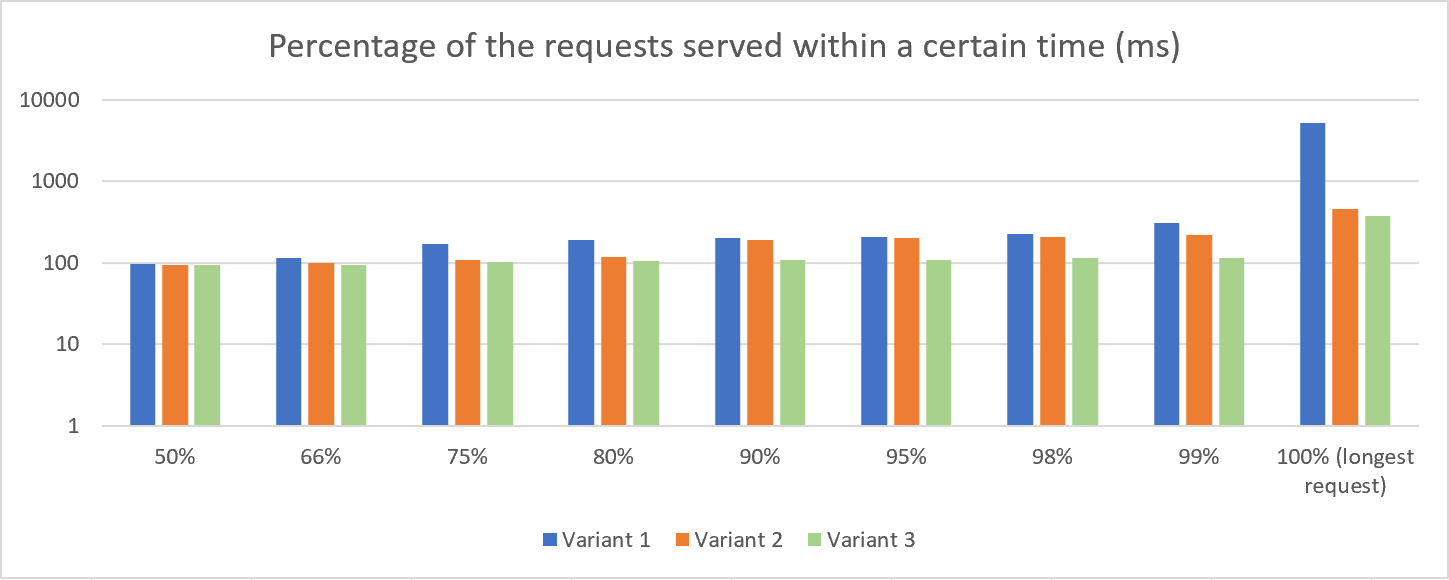
Update: What does moving from a shared hosting plan to a dedicated (managed) server bring?
After switching to a dedicated server, it is of course interesting to see how this step affects website performance. Here is a new measurement on a managed server for comparison with the above values, which were still measured on a shared web hosting package. Note: Unfortunately, the comparison is only partially suitable, as not only the system but also the provider has changed.
Variant 3 (static, HTML, but dedicated server):
Connection Times (ms)
              min  mean[+/-sd] median   max
Connect:        0    1   4.9      0      62
Processing:    13   28   9.4     31      94
Waiting:       11   25   7.3     31      47
Total:         13   28  11.7     31     141
Do you know the Apache Bench Tool? Do you have experience with other benchmark tools or additional tips? Feel free to write a comment.
Comments 0
Write new comment: