Texture Synthesis: Linear and Radial Gradients
On this page you will find a collection of various examples of texture generation for linear and radial gradients, mostly with just a few lines of source code.
The algorithms are written in C/C++ or ANSI-C and are intended to demonstrate how textures can be generated through program code.
I was inspired by the Khronos OpenVG 1.1 specification - with this 2D vector API it is possible to draw flexible gradients.
Gradient Textures
The following gradient textures are divided into two parts from a mathematical point of view: On one hand, a scalar gradient function is used that defines a value in the range [0, 1] for each pixel in the two-dimensional coordinate system. On the other hand, a color value is then interpolated for this gradient via a color ramp function.
Color Ramp Function
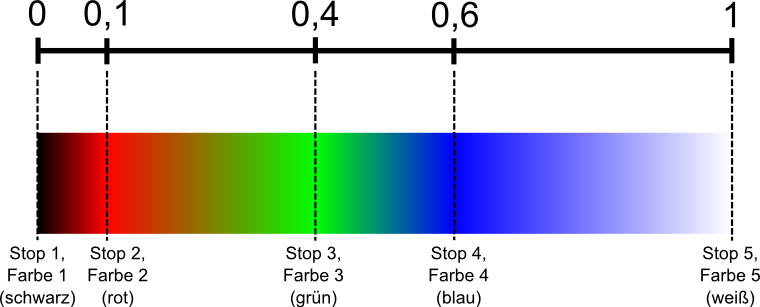
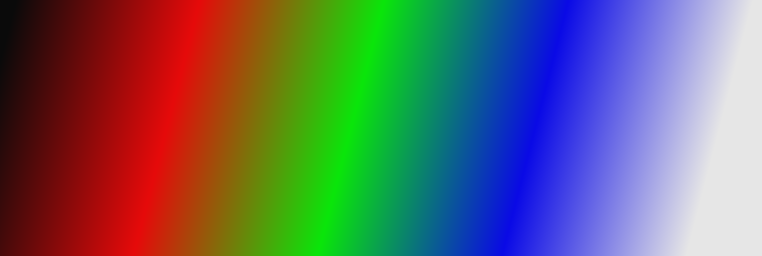
The color ramp function is intended to return a corresponding color value (32-bit, RGBA8888 format) from an input value in the range [0, 1]. For this purpose, five points (=stops) are defined in the range [0, 1], each assigned a specific color value. It is assumed that the two boundary values 0 and 1 are always included and the other three points lie between them in ascending order (spacing freely selectable). At each of these 5 points the color value is known; for values in between, the color must be linearly interpolated from the two neighboring stops. In the source code, the stops with color values are stored in an array.
Example for the five stops, with different spacings:
The linear interpolation can be set up using the intercept theorem:
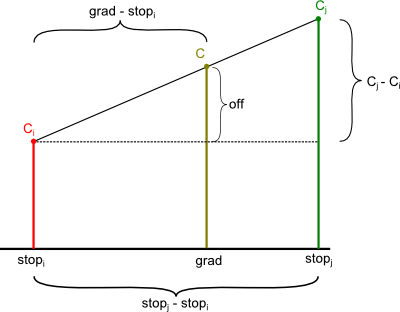
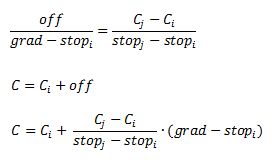
Source code of the color ramp function:
// type for color ramp stops
typedef struct {
  int    r, g, b, a;
  float  stop;
} stops_t;

// create an RGBA8888 color value based on an input gradient of range [0..1]
static unsigned int colorRamp(float grad) {
  int i, j, r, g, b, a;
  float alpha;
  stops_t stops[] = { //  red, green, blue, alpha, gradient
                      {  10,    10,    10,   255,  0.0f },  // black
                      { 230,    10,    10,   255,  0.1f },  // red
                      {  10,   230,    10,   255,  0.4f },  // green
                      {  10,    10,   230,   255,  0.6f },  // blue
                      { 230,   230,   230,   255,  1.0f },  // white
                    };
  if (grad < 0.0f)  grad = 0.0f;
  if (grad > 1.0f)  grad = 1.0f;
  // find the two nearest stops
  for (i = 0; i < 4; ++i) {
    if (grad < stops[i+1].stop) {
      break;
    }
  }
  j = i + 1;
  // linear interpolation of two stop colors
  alpha = (grad - stops[i].stop) / (stops[j].stop - stops[i].stop);
  r = (int)(stops[i].r + (stops[j].r - stops[i].r) * alpha);
  g = (int)(stops[i].g + (stops[j].g - stops[i].g) * alpha);
  b = (int)(stops[i].b + (stops[j].b - stops[i].b) * alpha);
  a = (int)(stops[i].a + (stops[j].a - stops[i].a) * alpha);
  return (r << 24) | (g << 16) | (b << 8) | a;
}
Linear Gradients with Color Ramp
A linear gradient is uniquely defined by two points (x0, y0) and (x1, y1). The following properties shall apply to the gradient function:
- The gradient is 0 at point (x0, y0).
- The gradient is 1 at point (x1, y1).
- The value shall increase continuously along the line from (x0, y0) to (x1, y1).
- The value is constant on all lines that run parallel to the line from (x0, y0) to (x1, y1).
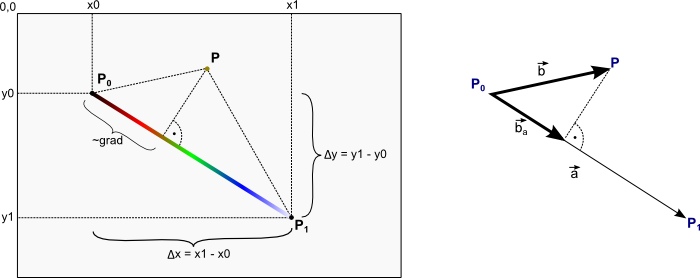
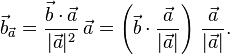
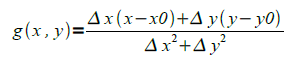
Mathematically, the gradient can be determined via two vectors using the dot product. By orthogonal projection of vector b' onto the direction determined by a'. The gradient is normalized to the length of vector a'; summarized, this gives:
Example image for a linear gradient:
Source code for generating the linear gradient:
// see color ramp code above
static unsigned int colorRamp(float grad);
// ptr points to a memory buffer of size width * height * sizeof(unsigned int)
static void genLinearGradient(unsigned int *ptr, int width, int height,
                              float x0, float y0, float x1, float y1) {
  int x,y;
  float deltaX, deltaY, grad, denom;
  deltaX = x1 - x0;
  deltaY = y1 - y0;
  denom = 1.0f / ((deltaX * deltaX) + (deltaY * deltaY));
  for (y = 0; y < height; ++y) {
    for (x = 0; x < width; ++x) {
      // gradient value in the range [0..1]
      grad = (deltaX * (x - x0) + deltaY * (y - y0)) * denom;
      *ptr++ = colorRamp(grad);
    }
  }
}
...
// example call
genLinearGradient(buf, width, height, 10.0f, 20.0f, 700.0f, 200.0f);
Radial Gradients with Color Ramp
A further variation makes it possible to generate textures with radial gradients. A gradient circle is defined with the center point (cx, cy) and the radius r. Additionally, a focal point (fx, fy) is defined within the circle. The value of the gradient function shall be 0 at the focal point and 1 at the circumference of the circle. The following sketch illustrates the situation (source of the figure: Khronos OpenVG 1.1 Specification):
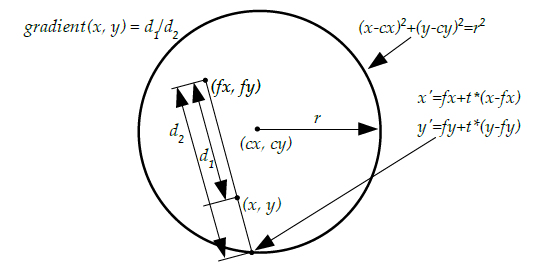
Through some transformations, the following gradient formula is obtained (more details can be found in the OpenVG 1.1 Specification):

Example image - Radial Gradient Texture:
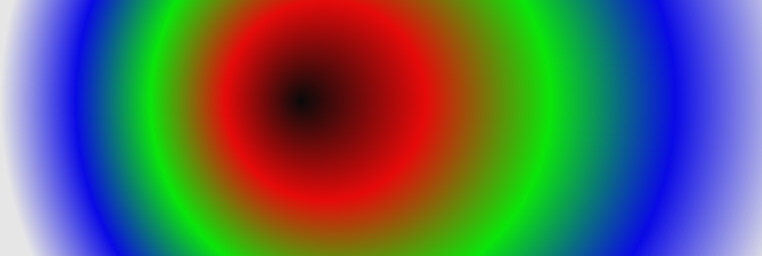
Source code for generating the radial gradient:
// see code above
static unsigned int colorRamp(float grad);
// ptr points to a memory buffer of size width * height * sizeof(unsigned int)
static void genRadialGradient(unsigned int *ptr, int width, int height,
                              float cx, float cy, float radius, float fx, float fy) {
  int x,y;
  float grad, fx_, fy_, dx, dy, denom, radius2, dx2, dy2;
  fx_ = fx - cx;
  fy_ = fy - cy;
  radius2 = radius * radius;
  denom = 1.0f / (radius2 - ((fx_ * fx_) + (fy_ * fy_)));
  for (y = 0; y < height; ++y) {
    for (x = 0; x < width; ++x)  {
      dx = x - fx;
      dy = y - fy;
      dx2 = dx * dx;
      dy2 = dy * dy;
      grad = (radius2 * (dx2 + dy2)) - ((dx * fy_ - dy * fx_) * (dx * fy_ - dy * fx_));
      grad = ((dx * fx_ + dy * fy_) + sqrtf(grad));
      grad *= denom;
      *ptr++ = colorRamp(grad);
    }
  }
}
Did you enjoy the article on texture generation with linear and radial gradients? Do you have suggestions, additions or did you find an error? Feel free to write a comment...
Comments 0
Write new comment: